

Is Your Windows 10 PC Vulnerable? The End of Security Updates is Near

- 2
It seems like a few months ago that Windows 10 came out with fanfare and the usual Microsoft noise about being the greatest and biggest thing in the tech world. Laptop manuafactures who are usually very quick to jump onto the bandwagon and start advertising their latest and greatest laptop running proudly on the latest shiny operating system did exactly that. Obviously they make more sales during these periods of change. But after years of being Microsoft’s main operating system, Windows 10 is being put to pasture and relegated to the dustbins of technology having been on the mountain top for years. In essence, Windows 10 will not be receiving any security or feature updates from the 14th of October 2025. Microsoft has been saying this for some time now to anyone who would listen.
What Are Security Updates in Windows 10?
Security updates are special fixes Microsoft releases to close gaps in Windows 10’s defenses. These gaps—called “vulnerabilities” — are like unlocked doors or cracked windows in your digital house. If left open, hackers, viruses, and other malicious software could sneak in and cause harm, steal data, or even take control of your PC.
When Microsoft discovers a vulnerability—either on its own or after security researchers report it, it creates a small software patch to fix the problem. These patches are bundled into security updates, which Windows 10 can download and install automatically through the Windows Update feature. Windows update is a service that is already on your windows computer that runs in the background and makes sure that anytime Microsoft publishes an update, the update is installed on your computer with no fuss. Compared to previous decades, Windows update has improved significantly to a point of it being very useful without wanting to pull your hair out. I have had a hit and miss relationship with Windows Update in the past, with the worst being a bricked computer that was nuked by a windows update (story for another day). But for the majority of times of late, the relationship has been good, with windows update chugging along quietly in the background keeping my PCs updated.
By applying these updates regularly, you:
- You occassionally get new features
- Block known threats before they can attack.
- Reduce your exposure to new types of malware.
- Protect sensitive information like passwords, bank details, and personal files.
- Skipping security updates is like leaving your front door unlocked just because no one has broken in yet, very risky and unnecessary especially considering the updates are free.

Will my computer stop working on October 14th?
NO, despite the signs and prompts that Microsoft sends you, your Windows 10 will continue to work for as long as you want it to work. This means nothing visible will change. You will use the software on your machine as normal. You will continue to browse the web and search for cute cat pictures or whatever floats your boat. Your hardware will continue to work fine.
However…
The biggest change is that Microsoft will no longer be making any security and feature updates for Windows 10. This means security wise you are on your own. No new features will be added to the operating system (not that they made any new compelling features anyway). This means that if a security vulnerability is discovered after 14 October, your computer might be open to attacks from hackers, malware and every bad thing under the sun. No calvary will be coming from Microsoft. No updates will be issued. Actually I strongly believe hackers and threat actors are waiting for vulnerabilities in the background to use after October 14 and get the most bang for their attacks knowing Microsoft wont react or update the hundreds of millions of PCs running Windows 10. With time, more and more software will begin dropping support for Windows 10 and only work on newer operating systems.
Is all hope lost then?
No, not all hope is lost. There are a few things you could do that means that you have a properly protected working machine after 14 October. Microsoft recommendation is to upgrade to Windows 11 (good advice). Their in place upgrade assistant is brilliant. I have done multiple upgrades for lots of PCs in my life and this upgrade for one of my machines was the smoothest ever. I simply went to my browser, searched for Windows 11 Upgrade, and was taken to Microsoft Upgrade Assistant page. I downloaded the small program and started running it. It downloaded a few more things, did a few checks and it happily went on its way. It told me that I could continue using my machine and I did. Continued working happily as it downloaded Windows 11 in the background. And then after an hour told me hey, I’m almost done here, but would you mind closing and saving your work so that I can restart. And I went, “Oh please go ahead”. And away it went, machine restarted and some minutes later, I was back in with Windows 11 and all my data and programs intact and working fine as before. This was impressive.
There are many ways to upgrade to Windows 11. One is manually as described above. Other way include waiting for Windows 10 itself to prompt you to upgrade using Windows update. This method is also straightfoward. The machine just wakes up one day and say hey, I have a new operating system downlaoded and ready to install, do you wanna go ahead. Say yes and upgrade process starts.
To find out more way to upgade to Windows 11, check this link (https://support.microsoft.com/en-au/windows/ways-to-install-windows-11-e0edbbfb-cfc5-4011-868b-2ce77ac7c70e)
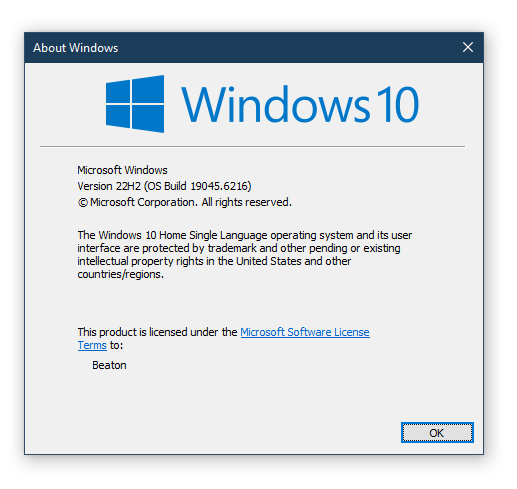
Hey wait a second, my machine cannot upgrade to Windows 11
Oh yeah, about that. Forgot to mention this. Windows 11 has hardware requirements that mean that only machines or laptops purchased in the last 4 or 5 years will run Windows 11. Anything older than that, you will find that Windows 11 will refuse to install. This is basically Microsoft’s way of telling you to go and buy a new laptop. Which sucks a lot. I have one other laptop in this conondrum, which I purchased back in 2016 running Windows 10, and I’m also stuck on Windows 10.
If you are in this same boat, there’s not much to do. Depending on your level of expertise, there are ways and means to try and force Windows 11 to install but Microsoft recommends against this and they basically warn you saying yes you will install Windows 11, but there’s no gurantee that it will continue to work in future. Basically saying we will actively disable your machine if you do this, but wrapped in the usual marketing cover-your-backside words like security, safety, user experience etc etc.
To some extent it feels like we are being shafted here by Microsoft for having old laptops. If you are brave and still want to use your old laptop and dont want the risk of running Windows 10 with no security updates, you have options to install Linux. Ubuntu is a highly supported operating system that will run on very old machines without too much fuss. There will be incompatibilities if you had specialised software on your windows computer. But worth checking out or trying if you have the patience to switch.
Or just keep running Windows 10, and see what comes your way and hope that your antivirus has active threat assessment to help you to some extent. Whichever way, we are cooked, Windows 10 is on its way out, screaming and squealing as we the users still want it, but the mothership has other plans. For now, lets enjoy our last few weeks of support on Windows 10.
Till we meet agan in Windows 11, stay safe out there.
ADVERTISEMENT


2 thoughts on “Is Your Windows 10 PC Vulnerable? The End of Security Updates is Near”
This was a really fun read, informative and funny at the same time… typos sure buuuuuuutttttt captivating yet mostly informative!
Nice article indeed