WhatsApp Parent-Managed Accounts: Complete Setup Guide for Parents

WhatsApp is forever introducing new features such that it’s difficult to keep up these days. Gone are the days when WhatsApp used to be a clean and simple app doing one thing very well, which was messaging and video calling. Now, there’s so much more it does. Some for good, some not so much. This new feature, the focus of this article, has been around since the beginning of the year (around March 2026).
What are Parent-Managed WhatsApp Accounts (PMWA)?
Well, it’s pretty much exactly as it sounds: a WhatsApp account that is managed by parents on behalf of a minor. As WhatsApp describes it:
“Parent-managed accounts allow children under 13 (or older, as required by your country or region) to communicate with their family and friends on WhatsApp with parental supervision.”
With this management come additional and extra controls that the kids adopt, especially regarding contacts and privacy. When a child uses a parent-managed WhatsApp account, only those contacts who are saved on the phone can message or call. Additionally, only saved contacts have the ability to see the profile photo, “about” info, and when they are online. This provides an extra layer of security for our young ones.
In addition to this restriction, many other features of WhatsApp are disabled, including:
- Meta AI
- Channels
- No ability to set statuses or view statuses from other people
- Location sharing
- View once messages
- Disappearing messages
All these features are not available, are disabled, and cannot be used. Although disabling location sharing protects a child’s privacy, I believe it’s a lost opportunity for kids to share their location with their parents, including live location. I could see this feature being useful for parents tracking their children. Everything else, I agree with being off; they are of no use to a minor.
One thing to note is that for a child with a parent-managed account, make sure to put in the correct date of birth during setup, as this will determine when the child will transition into a full WhatsApp account. For most countries, this is 13 years. On their 13th birthday, the parents get a notification to start the process to transition. This is similar to what Google Family Link does when one reaches 13.
A short note on groups
A PMWA can be added to groups by accepting group invites from saved contacts. Any unknown contact group invites are automatically sent to the parents for approval before the minor joins any group. As a parent, you also get notifications, like when a group has had new people added or has grown in size, or when the minor creates a group themselves. Notifications will also be sent to the parent when a child leaves a group.
How do I set it up for my child?
Unfortunately, PMWA can only be set up during the initial WhatsApp setup, meaning that an existing account cannot be converted to PMWA without reinstalling WhatsApp. If you want to transition an existing phone number to a managed state, you will need to back up any necessary chats for your child, delete or reinstall the app on the child’s device, and start registration fresh for them.
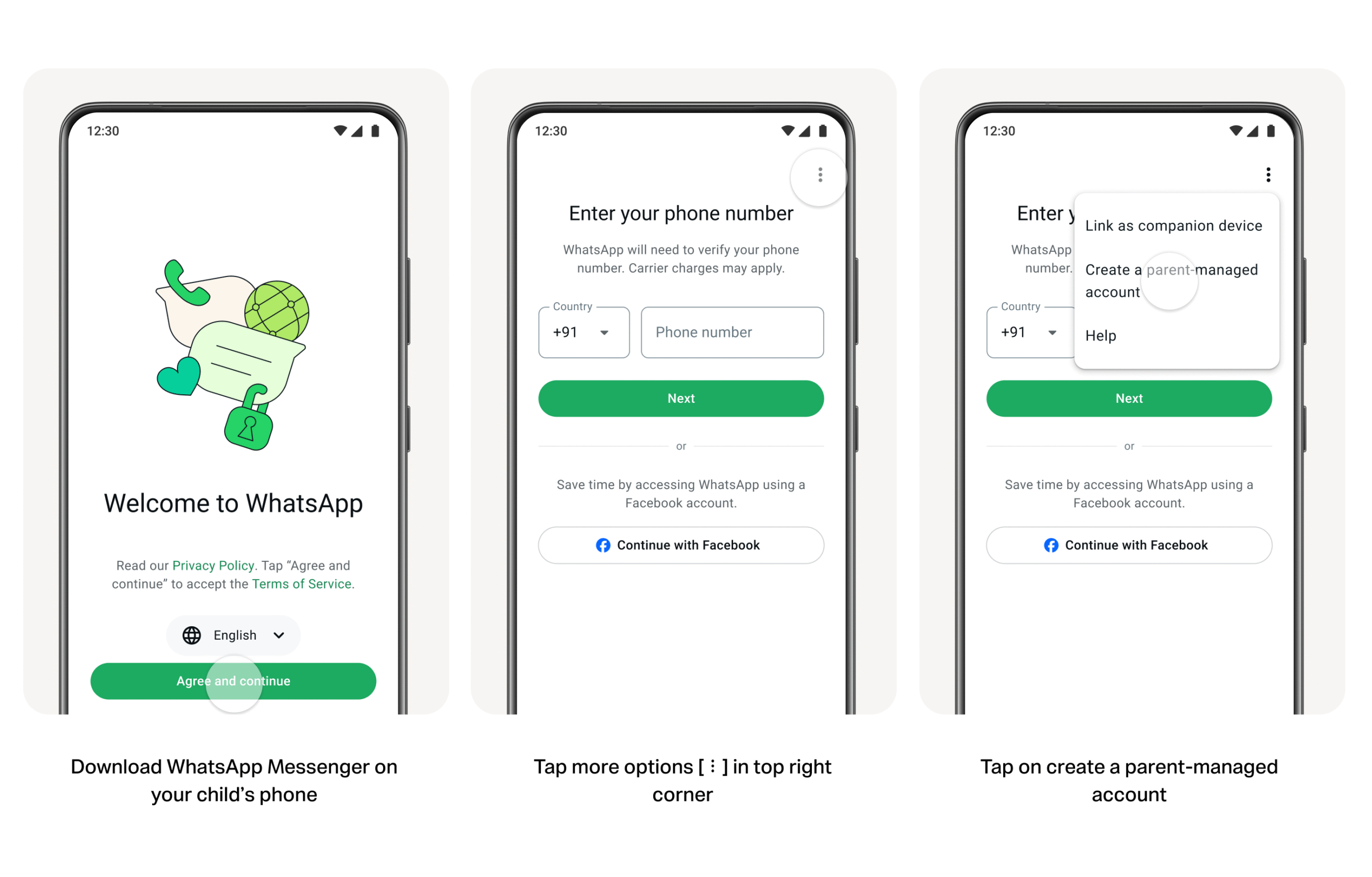
Step by step
• Open WhatsApp on the child’s device after a fresh install.
• Tap Agree and continue, then select More options and choose Create a parent-managed account.
• Enter the child’s phone number and accurate date of birth.
• Scan the QR code displayed on the child’s device using your own smartphone camera to link the accounts.
• Confirm your adult status and create a secure 6-digit parent PIN on your device to lock down settings.
• Tap Doneto complete setup on the child’s phone.
Once you have linked your child’s account to your account, you can manage the rest of the settings for the child on your own phone in WhatsApp. You can access your parental controls for your child via Settings > Parental controls on your phone. If you have done the process for multiple children, all of them will appear in your parental control dashboard, and you can switch amongst them. You can set unique privacy options, review activity alerts, and manage contacts for each child.
My Thoughts
This is a very good thing. Unintentionally, parents are exposing their children to online access via these apps without really putting much thought into the potential dangers these apps expose them to. WhatsApp, in this case, clearly knows the dangers for the young ones and has tried to put in place controls to allow children to be protected, with the parents acting as the gatekeeper. And remember, because of WhatsApp’s end-to-end encryption, parents will not be able to see their children’s messages without physically taking the phone, allowing the children a semblance of privacy. Any tool that gives parents control over what children consume gets a plus in my books.
Is this something that you think you would do for your child?
Till next time, happy reading.